Student Timetable Helper1.26
Publisher Description
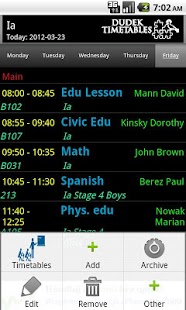
Simple to use, multi timetable browser for students.
The most feature-rich student planner for Android in http://www.addictivetips.com/mobile/150-best-android-apps-of-year-2011-editors-pick/
Remark: The comment that there is no copy paste function is not true. There are a few ways to enter your timetable fast:
* copy-paste /a menu option/,
* dictionaries /looking buttons/,
* archive /you can store your partially created timetable to load it quickly if removed accidentally or due to some phone issues/.
This version of "Timetable Browser" is designed to help students remember their classes, tasks and simplified for their needs.
Each note can have a reminder or alarm assigned. There are lots of options: 15 minutes, 1 hour, week, before lesson as well as in the evening of the day before or morning in the the activity day. Alarms can be set on the particular time or on daily basis including working days only and can be integrated with Google calendar.
You can browse a few timetable at the same time for instance each family member timetable.
Widgets will help you to be updated with your previous, current & next activity or the most recent activities of your family members. Be informed just from your home phone screen & optionally by notification sounds when your recent activities are updated. Now each widget can control silent or vibrate only mode during classes, activities.
Features:
- alarms integrated with Google calendar,
- widgets with previous, current & next activity controlling phone silence or vibrate mode during classes,
- free online archive account at http://www.school-timetable.eu/timetables/login (with internet access mode to archived timetables)
- integrated with Google speach recognition engine,
- subjects, lessons etc. dictionaries.
- colors for classes
- integrated with mobile applications: Teacher Timetable Helper & Parent Timetable Helper
- easy switching between school & private modes
- receiving notification about school teachers substitutions, announcements, student homeworks
- sending messages to other students from selected courses
- access online to teachers substitutions, announcements, student homeworks at www.school-timetable.eu
- transparent widgets with progress bar
To use new school mode features you need turn on "School Mode" in menu "Preferences". While doing it you will be switched to log into new school account. The "School mode" can use different account from the private mode. At login page you can reuse your private archive account or log into a new one for this mode.
Now you will be switched again to "Preferences" page to select timetables you are interested in and credentials.
Students & parents can access their timetables/teachers substitutions/school messages & homeworks online by logging into http://www.school-timetable.eu/timetables/android_login
Please keep e-mailing me with any questions or feedback!
Now you can use "Smart Timetable Planner 3.0" (market://details?id=eu.schooltimetable.android.planner) which is modernised version of this application. Discover the new features.
To migrate you can simply store your timetables to server archive and reload them in the new planner because the server archive is shared among the applications.
Localized to German, Chinese, Polish, French, Spanish, English
About Student Timetable Helper
The company that develops Student Timetable Helper is Wieslaw Dudek. The latest version released by its developer is 1.26. This app was rated by 1 users of our site and has an average rating of 4.0.
To install Student Timetable Helper on your Android device, just click the green Continue To App button above to start the installation process. The app is listed on our website since 2012-11-17 and was downloaded 113 times. We have already checked if the download link is safe, however for your own protection we recommend that you scan the downloaded app with your antivirus. Your antivirus may detect the Student Timetable Helper as malware as malware if the download link to eu.schooltimetable.android.student is broken.
How to install Student Timetable Helper on your Android device:
- Click on the Continue To App button on our website. This will redirect you to Google Play.
- Once the Student Timetable Helper is shown in the Google Play listing of your Android device, you can start its download and installation. Tap on the Install button located below the search bar and to the right of the app icon.
- A pop-up window with the permissions required by Student Timetable Helper will be shown. Click on Accept to continue the process.
- Student Timetable Helper will be downloaded onto your device, displaying a progress. Once the download completes, the installation will start and you'll get a notification after the installation is finished.
Program Details
System requirements
Download information
Pricing
Version History
version 1.26
posted on 2012-11-17
Several fixes and updates
version 1.26
posted on 2012-11-17
New features:,- Gap mode for timetable/widget,- Times of lesson definition,- Timetable replacement for widgets /holidays, two weeks timetable mode etc./,- A few improvements,Most of the following notes are also applicable to Student Timetable Helper:,http://www.school-timetable.eu/access/FAQ_teacher_timetable_helper
